About the Ignition Module
| Platform: | AvailableWebNot availableMobile |
|---|---|
| Plan Type: | Not availableBasicNot availableEssentialAvailablePremiumAvailableEnterprise |
| User Type: | Not availableRequesterNot availableFull UserAvailableAdministrator |
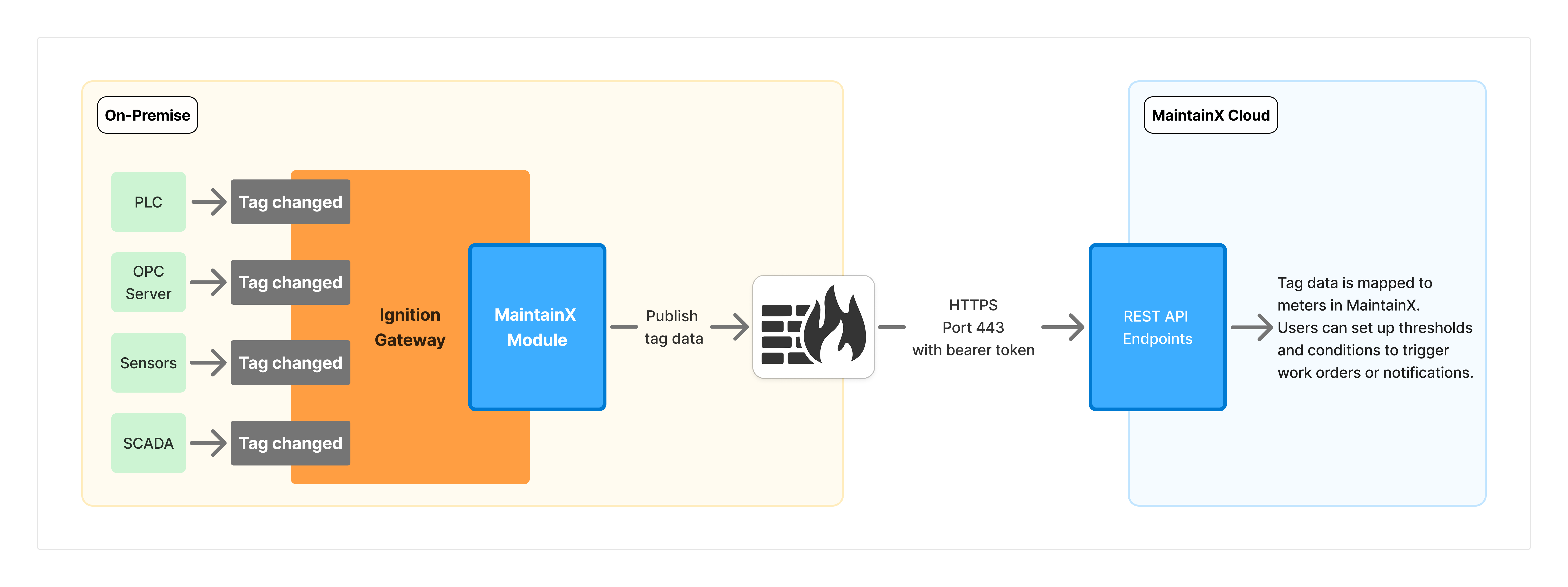
The MaintainX® Ignition Module (referred to as the Ignition module) allows you to stream real-time tag data into MaintainX to power condition-based maintenance, asset tracking, asset status changes, usage-based maintenance, insights, and alerts. The module maps Ignition tag data to meters in MaintainX, where you can set up thresholds and conditions to trigger work orders or notifications.
Requirements
-
Supported Ignition Version: We support Ignition versions greater than
8.1.3but within the8.1.xseries. For Ignition 8.3, see the 8.3 documentation. -
Ignition Gateway: Access to your Ignition Gateway with a user who has an Administrator role with the following permissions:
- Gateway Config Permissions
- Gateway Status Permissions
-
Tags: configured in Ignition.
-
MaintainX Account: Integration Connectors permissions. Contact your organization's Administrator to request access to the OT data connectors feature.
-
Network Requirements: The Ignition module requires outbound internet access to communicate with MaintainX's cloud infrastructure. Your firewall must allow connections to the following endpoint.
Parameter Value Protocol HTTPS (TLS) Direction Outbound only Destination URL https://agent.maintainx.com/Port 443SecurityThe module only initiates outbound connections from your network. No inbound firewall ports are required. For more details on security architecture, see Security.
Key Concepts
Connectors
You can use one Ignition module installation to send tag data to multiple MaintainX integration instances across one or more organizations. Each configured connection to an integration instance is called a connector in the Ignition module, and it acts as the link between your Ignition Gateway and a single MaintainX integration instance. For each connector, you select the tag paths and folders to monitor, and updates for those tags are sent only to that instance.
Only some tag types are supported, and there are limits on how many connectors you can set up. For more information on connector limits, tag paths, and tag counts, see Limitations.
Monitoring Tag Paths and Folders
Select tags to monitor by adding tag paths or entire folders.
If you add tags to a folder that's already monitored, they're automatically discovered and added to MaintainX. Folders are automatically rescanned every hour to ensure new tags are picked up.
To force a rescan, go to the MaintainX Module Settings page in the Ignition Gateway, locate and edit the connector you want to trigger a rescan for, and select Save changes.
Tag Updates
To reduce bandwidth consumption and noise, the Ignition module only sends data when a tag value changes. It also supports batching of multiple updates to reduce the number of messages sent. Once it has enough data to complete a batch, it sends the data without waiting for the next update.
Tag Filtering
To manage tag updates efficiently, the Ignition module applies a combination of Time-Based Hysteresis and Token Bucket filters. These filters help reduce noise so the system isn't overwhelmed with too many updates. When a tag update is filtered, it isn't sent to MaintainX.
Time-Based Hysteresis
Time-Based Hysteresis filters out minor changes if the new value is within 1% of the last accepted value. It still allows an update if it's been at least 1 second since the last accepted value. This prevents jitter while ensuring periodic updates.
Example:
| Time (ms) | New Value | Data Sent to MaintainX? |
|---|---|---|
| t = 0 | 100 | ✅ Yes |
| t = 100 | 100.5 | ❌ No, because this is a minor change (≤ 1%) that occurred within less than one second of the last accepted value. |
| t = 1000 | 100.5 | ✅ Yes, because one second or more has elapsed since the last accepted value. |
Token Bucket Filtering
Token Bucket Filtering allows short bursts of five updates, then enforces a steady rate of one update per second. This ensures that the system can handle spikes in data and then smooths out the flow of updates.
Example:
| Time (ms) | Tokens Left | Bucket refill Triggered | Data Sent to MaintainX? |
|---|---|---|---|
| t = init | 5 | N/A | N/A |
| t = 0 | 4 | No | ✅ Yes |
| t = 100 | 3 | No | ✅ Yes |
| t = 200 | 2 | No | ✅ Yes |
| t = 300 | 1 | No | ✅ Yes |
| t = 400 | 0 | No | ✅ Yes |
| t = 500 | 0 | No | ❌ No (rate limited) |
| t = 1000 | 0 → 1 → 0 (refill to 1, then consume 1) | Yes (1 token) | ✅ Yes |
| t = 1100 | 0 | No | ❌ No (rate limited) |
| t = 5000 | 0 → 5 → 4 (refill to 5, then consume 1) | Yes (5 tokens) | ✅ Yes |
Supported Tag Types
The Ignition module supports the following tag types:
IntegerFloatStringTextDatetimeBoolean
MaintainX also streams tags from User Defined Type (UDT) instances. Each UDT instance is treated like a folder, and member tags of the types listed above are sent to MaintainX with their paths flattened using a slash (/) separator. For details, see Enter Tag Paths in the Ignition Module.
Meter Naming
MaintainX derives meter names from tag paths. For example, if the Ignition tag is:
[default]Boiler1/Temperature
The MaintainX meter name will be:
[default]Boiler1/Temperature
Limitations
-
The Ignition module only supports non-complex tag types.
- For more information, see Supported tag types.
-
The module can connect to a maximum of 100 connectors.
-
Each connector can subscribe to a maximum of 300 tag paths.
-
Each connector can handle up to 6,000 tags.
-
The module supports a maximum of 20,000 tags total across all connectors (subject to the per-connector limit above).
Learn More
To learn more about how to set up and use the Ignition module, see the following: