About the MaintainX® SAP Integration
MaintainX integrates with SAP to synchronize maintenance, inventory, and purchasing data between systems, keeping records accurate in both platforms without manual data entry.
Requirements
Before starting the integration process, confirm the following requirements are in place:
-
MaintainX plan: The SAP integration requires an active MaintainX Enterprise plan.
-
SAP integration services package: This is a paid add-on. MaintainX will work directly with your organization to scope workflows and finalize a Statement of Work before setup begins. Contact your MaintainX representative if you're unsure whether it's included in your contract.
-
SAP environment: The integration supports the following SAP environments:
- SAP ECC
- SAP S/4HANA Cloud, Private Edition
- SAP S/4HANA Cloud, Public Edition
- SAP S/4HANA, On-Premise
-
SAP admin access: You'll need SAP administrator access to complete setup steps.
-
Workato Account: Your assigned MaintainX integrations consultant will provide a Workato account and guide you through onboarding. If you don't have one yet, contact your MaintainX representative.
You don't need to determine your connection method or protocol before getting started. MaintainX will recommend the appropriate setup for your environment during onboarding.
Choose an Integration Workflow
Most integrations between MaintainX and SAP follow one of two workflows, depending on how your organization uses SAP.
Integration workflows refers to the scope of your integration, detailing what data synchronizes between MaintainX and SAP. Integration method (covered in the next section) refers to how the connection is technically built.
| Workflow 1 | Workflow 2 | |
|---|---|---|
| Use Case | MaintainX drives maintenance execution and asset-specific reporting | Detailed asset-specific cost tracking required in SAP |
| Complexity | Lower | Higher |
| Implementation time | Shorter | Longer |
| Recommended | For most customers | When SAP PM is a requirement |
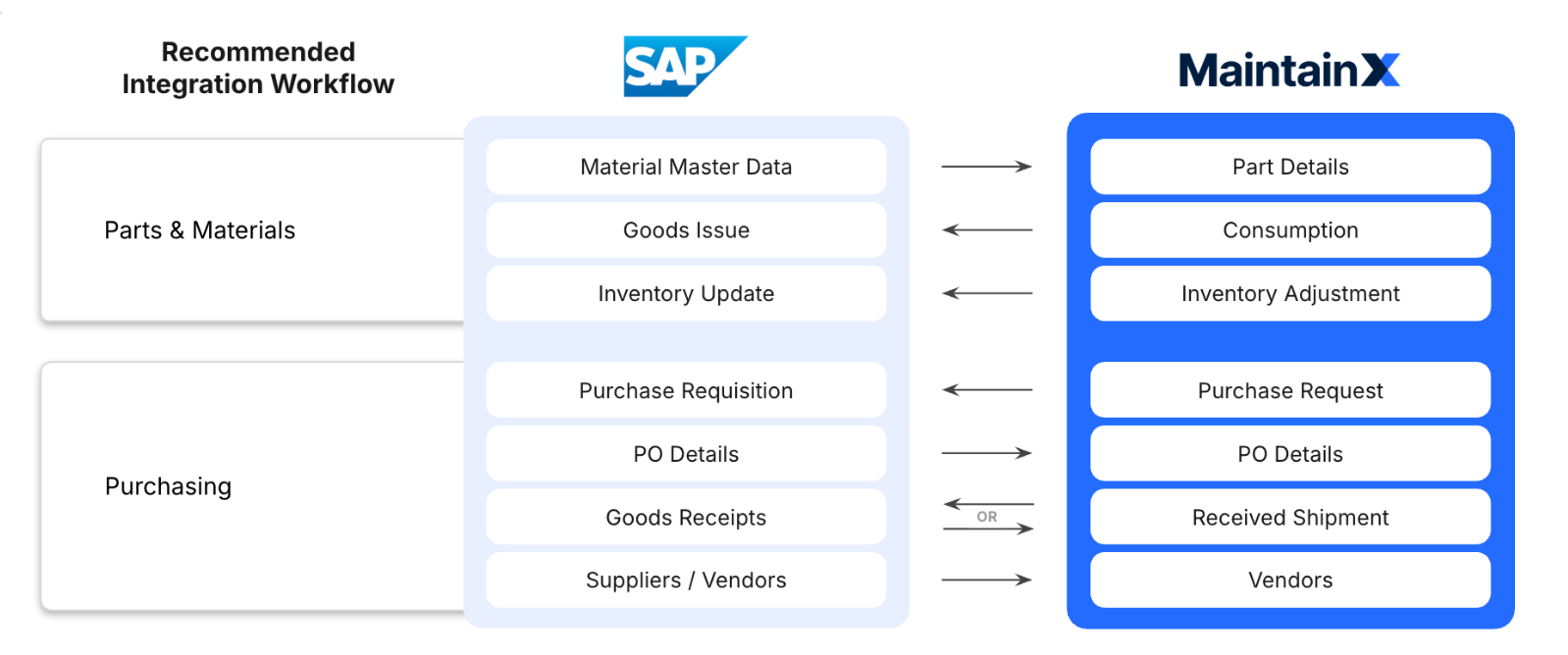
Workflow 1: Parts and Purchasing (Recommended)
Parts and Purchasing is the most common integration between MaintainX and SAP. MaintainX remains your system of record for maintenance execution, while SAP manages materials and purchasing workflows.
Workflow 2: Parts, Purchasing, and SAP Plant Maintenance
Workflow 2 extends the capabilities of Workflow 1 by including full integration with the SAP Plant Maintenance (PM) module. Select this option if your organization needs to manage maintenance orders and notifications directly in SAP. This is common for organizations with detailed cost center tracking needs or existing Plant Maintenance workflows that can't be easily migrated.
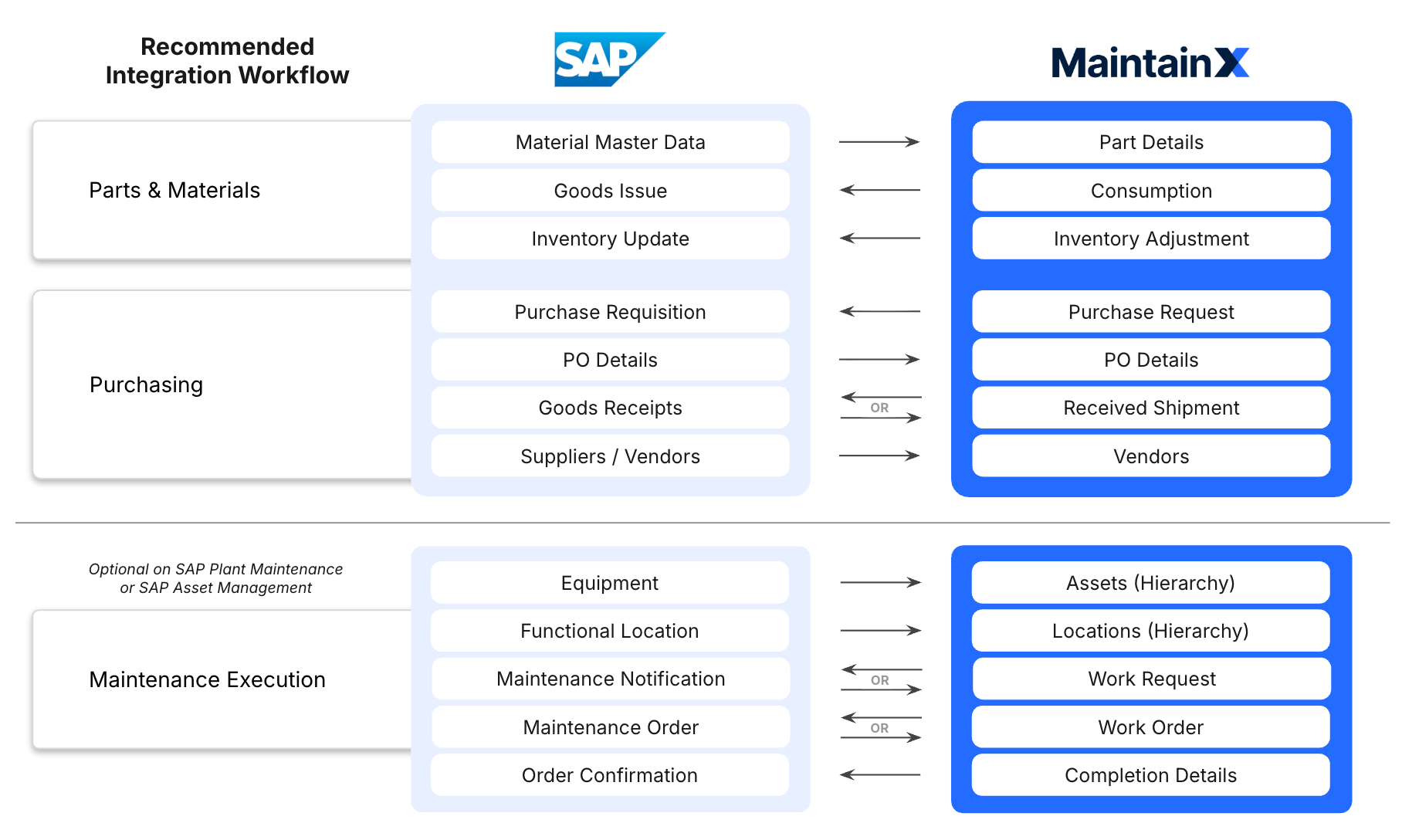
These workflows represent the most common integration patterns between SAP and MaintainX. Customizations are possible depending on your SAP configuration and business requirements. Contact your MaintainX integrations consultant to discuss options.
Choose an Integration Method
There are three ways to integrate MaintainX with SAP. This guide focuses on the MaintainX-Managed Integration via Workato setup. For more information about the other methods, contact your MaintainX integrations consultant.
-
MaintainX-Managed Integration via Workato: MaintainX sets up and manages the integration on your behalf using Workato, an industry-leading iPaaS (Integration Platform as a Service) trusted by thousands of enterprises to automate workflows across business systems. This is the most common path and provides the fastest time to value. For more information, see Connecting MaintainX and SAP.
-
MaintainX-Built Integration via SAP BTP (Business Technology Platform) Integration Suite: For organizations that prefer to own and manage the integration layer within their SAP environment.
-
Self-Serve via MaintainX REST APIs: For organizations that want to build a custom integration using the MaintainX API.
Synchronizing MaintainX and SAP: Supported Data Modules
Parts Inventory
Keep parts information and stock counts up to date in both platforms. For example, MaintainX receives parts information from SAP when purchase orders are fulfilled and sends back an updated count when parts are used for maintenance work.
The following MaintainX Parts Inventory data fields can be synchronized with SAP's Materials Management module:
- SAP Material ID
- Material Type
- Base Unit of Measure
- Weight Unit
- Volume Unit
- Gross Weight
- Net Weight
- Volume
- Size/Dimensions
- UPC Barcode
Purchase Orders (POs)
Create purchase orders in MaintainX and send them to SAP for approval. Track the status of purchase orders submitted via SAP in MaintainX.
MaintainX can synchronize the following Purchase Requisition and Purchase Order data fields with SAP's Materials Management/Purchasing module:
- Vendor/Supplier
- Material ID (Line Item)
- Quantity Ordered
- Quantity Received
- Unit Cost
- Price Unit
- Total Cost
- Purchase Requisition ID (If there is one)
- Purchase Order ID (If there is one)
Vendors
Keep vendor and supplier records synchronized between SAP and MaintainX. For example, MaintainX receives vendor information from SAP so purchase orders can reference accurate supplier information without manual entry.
The MaintainX/SAP integration can synchronize fields that store Vendor/Supplier master data in SAP's Materials Management module:
- Vendor/Supplier ID
- Vendor Name
- Address
- Contact Details
- Payment Terms
- Account Currency
Work Requests
Create work requests in MaintainX and send them to SAP for approval. Track the status of maintenance notifications submitted via SAP in MaintainX.
The MaintainX/SAP integration synchronizes work request data fields with SAP's Plant Maintenance module. The fields available depend on how your SAP installation is configured. For more information, contact your MaintainX integrations consultant.
Work Orders
Create work orders in MaintainX and send them to SAP for approval. Track the status of maintenance orders submitted via SAP in MaintainX.
If your MaintainX plan includes sub-work orders, parent work orders in MaintainX correspond to maintenance orders in SAP, while sub-work orders in MaintainX correspond to operations in SAP.
The MaintainX/SAP integration can synchronize work order data fields with SAP's Plant Maintenance module. The fields available depend on how your SAP installation is configured. For more information, contact your MaintainX integrations consultant.
Assets
Synchronize equipment records from SAP into MaintainX as assets, including parent-child hierarchy. Keep your assets consistent across both systems without duplicate data entry.
The MaintainX/SAP integration can synchronize fields that store Equipment data fields in SAP's Plant Maintenance module. The operations you can synchronize depend on how your SAP installation is configured. For more information, contact your MaintainX integrations consultant.
Locations
Synchronize locations from SAP into MaintainX, preserving the location hierarchy. Ensure assets and work orders in MaintainX reflect the same location structure as SAP.
The MaintainX/SAP integration can synchronize fields that store Location data in SAP's Plant Maintenance module. The operations you can synchronize depend on how your SAP installation is configured. For more information, contact your MaintainX integrations consultant.