About the Ignition Integration
| Platform: | AvailableWebNot availableMobile |
|---|---|
| Plan Type: | Not availableBasicNot availableEssentialAvailablePremiumAvailableEnterprise |
| User Type: | Not availableRequesterNot availableFull UserAvailableAdministrator |
The Ignition integration lets you stream real-time tag data from your Ignition Gateway into MaintainX®. The integration uses the MaintainX Ignition Module (referred to as the Ignition module), which you install on your Ignition Gateway to send tag data to MaintainX.
Ignition is one of MaintainX's supported, self-managed OT data connectors. The Ignition integration allows you to bring equipment and sensor data into MaintainX as part of Connected Data.
Integration Overview
Tag data flows in one direction, from your OT environment to MaintainX. You manage your OT systems and the Ignition module, and MaintainX receives the tag data that it sends.
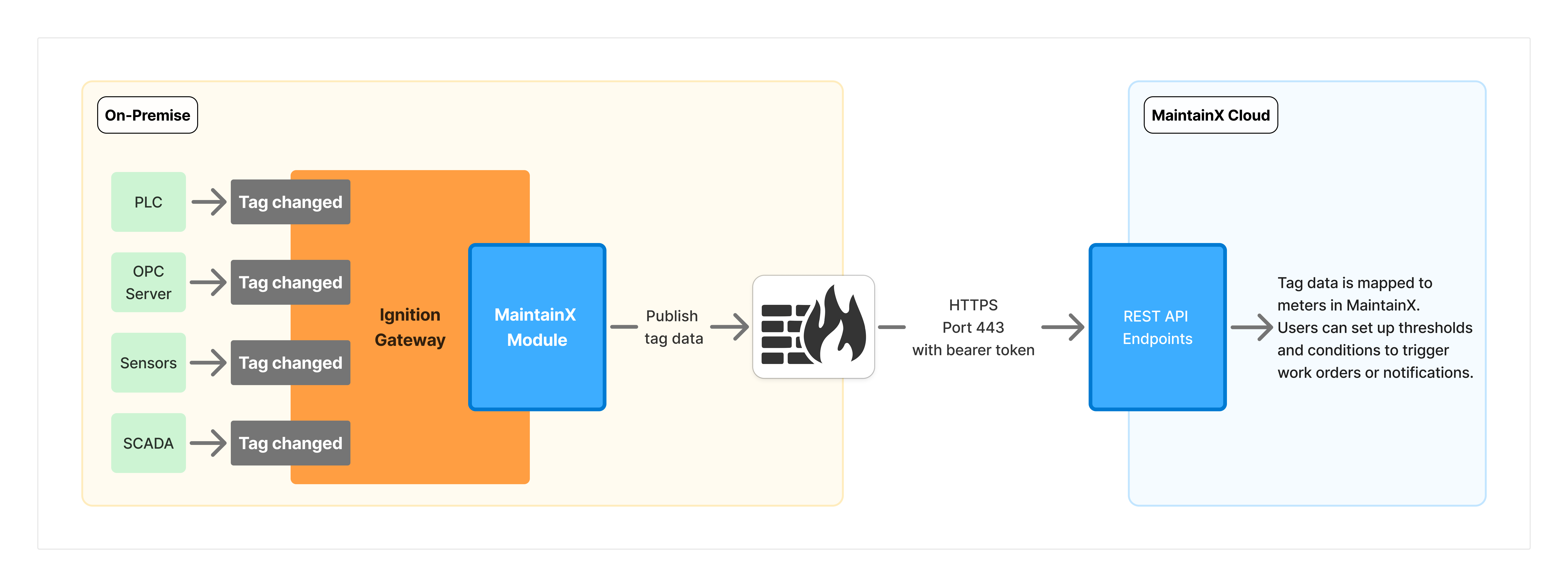
- OT sources: PLCs, OPC servers, sensors, and SCADA systems that provide tag values to your Ignition Gateway.
- Ignition Gateway: The platform that runs the Ignition module and reports tag value changes to it.
- Ignition module: The software on your Gateway that filters and batches updates for the tags you monitor, then sends them to MaintainX over an outbound HTTPS connection on port 443.
- MaintainX REST API: The cloud endpoints that receive the tag data, authenticated with a bearer token.
Once you map your tags to meters, you can set up automations that use incoming readings to trigger work orders, notifications, and alerts.
Requirements
Ignition Gateway
-
Supported Ignition version: Ignition version
8.3.6or later within the8.3.xseries. For Ignition 8.1, see the 8.1 documentation. -
Gateway access: Access to your Ignition Gateway with a user who has an Administrator role with the following permissions:
- Gateway Config Permissions
- Gateway Status Permissions
-
Tags: Tags configured in Ignition for the equipment or process data you want to monitor. You select which ones to monitor when you configure your Ignition tags.
-
Network: Outbound internet access to communicate with MaintainX's cloud infrastructure. Your firewall must allow connections to the following endpoint.
Parameter Value Protocol HTTPS (TLS) Direction Outbound only Destination URL https://agent.maintainx.com/Port 443 SecurityThe module only initiates outbound connections from your network. No inbound firewall ports are required. For more information on security architecture, see Security.
MaintainX Account
- Integration permissions: Administrator access in your organization to view and configure the Ignition integration.
Key Concepts
Connector
A connector is a configured connection in the Ignition module that links your Ignition Gateway to a single MaintainX connector instance. For each connector, you select the tag paths and folders to monitor. Updates for those tags are sent only to that connector instance.
You can create multiple connectors in one Ignition module installation. For limits on connectors, tag paths, and tag counts, see Limitations.
Connector Instance
A connector instance is the MaintainX side of a connector's connection. It receives the tag data that a connector sends. You create a connector instance in MaintainX, and it has its own access token and connection status.
You can send data from one Ignition module installation to multiple connector instances across one or more organizations. Each connector sends data to only one connector instance.
Ignition Module
The Ignition module is MaintainX software that you install on your Ignition Gateway. It monitors the tags you select, filters and batches their updates, and sends them to MaintainX over an outbound HTTPS connection. The module only initiates outbound connections, so you don't need to open any inbound firewall ports.
You configure one or more connectors in the module. Each connector sends data to a single MaintainX connector instance.
Meter
A meter records a measurement for an asset in MaintainX. You map each tag that the Ignition module sends to a meter on an asset. Smart tag mapping suggests a meter name, unit, and asset for each tag, and you can edit them before you accept the suggestion. MaintainX then stores each tag update as a reading on that meter.
Some existing connector instances use the auto-create meters feature instead of smart tag mapping. For those connector instances, MaintainX creates a meter for each tag and gives the meter the same name as the tag. Smart tag mapping isn't available for them. For more information, contact your MaintainX representative.
Tag
A tag is a reference to a specific data point in your Ignition Gateway, such as a sensor reading or machine status. The Ignition module sends each monitored tag's updates to MaintainX.