About the MQTT Integration
| Platform: | AvailableWebNot availableMobile |
|---|---|
| Plan Type: | Not availableBasicNot availableEssentialAvailablePremiumAvailableEnterprise |
| User Type: | Not availableRequesterNot availableFull UserAvailableAdministrator |
The MQTT integration lets you stream real-time tag data from your MQTT broker into MaintainX®. The integration uses the MaintainX MQTT On-Premise Agent (referred to as the OPA), which you install on a host system in your network to receive broker data and send it to MaintainX.
MQTT is one of MaintainX's supported, self-managed OT data connectors. The MQTT integration allows you to bring equipment and sensor data into MaintainX as part of Connected Data.
Integration Overview
Tag data flows in one direction, from your OT environment to MaintainX. You manage your OT systems and the OPA, and MaintainX receives the tag data that it sends.
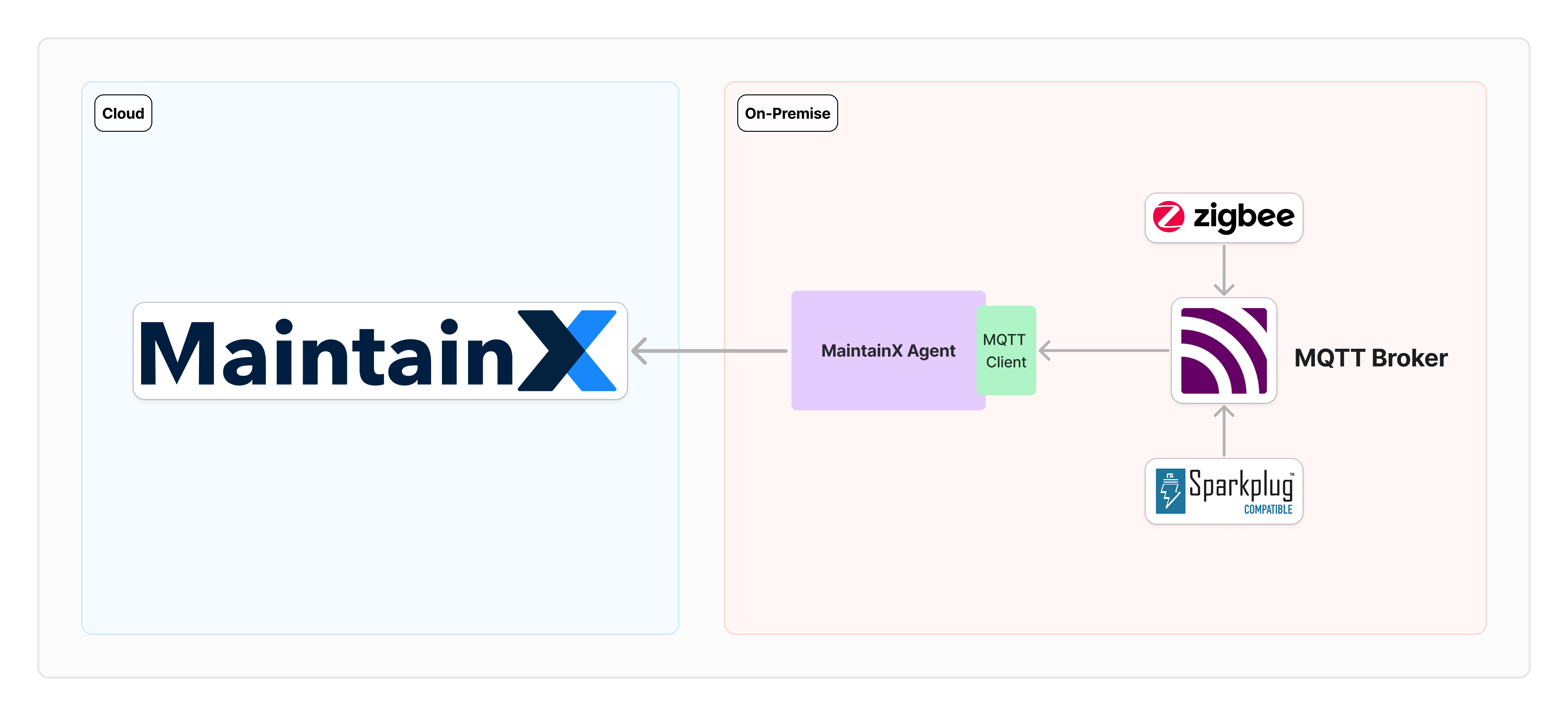
- MQTT clients: The devices and systems that publish data to your MQTT broker, including Sparkplug B and Zigbee2MQTT sources.
- MQTT broker: The messaging broker that receives and publishes those messages.
- OPA: The agent on a host system in your network that subscribes to the topics you declare, decodes payloads into tag readings, and sends them to MaintainX over an outbound HTTPS connection on port 443.
- Connector instance: The MaintainX endpoint that receives the readings, authenticated with the OPA's access token.
Once you map your tags to meters, you can set up automations that use incoming readings to trigger work orders, notifications, and alerts.
Requirements
Host System
- Operating system: An operating system with Linux-based container support.
- Software: A container runtime, such as Docker, installed on the host system. For more information, see the Docker Installation Guide.
- Network: Outbound network access from the host system to
https://agent.maintainx.com/on port 443.
MQTT Broker
- Broker: A messaging broker that uses the MQTT protocol. It receives and publishes messages from different systems, such as Sparkplug, Majik, or AWS IoT Core.
- Network: Access from the host system to the MQTT broker.
MQTT Client
- Clients: One or more MQTT clients that publish data to the broker. The OPA reads flat (custom) MQTT topics, Sparkplug B, and Zigbee2MQTT. For how each maps to a subscription, see Subscription Types.
MaintainX Account
- Integration permissions: Administrator access in your organization to view and configure the MQTT integration.
Key Concepts
Connector Instance
A link between one MQTT broker, through one host system and one OPA, and your MaintainX organization is called a connector instance. Each connector instance has its own unique access token that authenticates the OPA with the MaintainX platform.
Multiple connector instances per organization are supported, so you can connect brokers across different facilities or sites. Each connector instance must have its own token, and tokens aren't shared between connector instances. For more information, see Multiple Connector Instances.
Meter
A meter records a measurement for an asset in MaintainX. You map each tag that the OPA sends to a meter on an asset. Smart tag mapping suggests a meter name, unit, and asset for each tag, and you can edit them before you accept the suggestion. MaintainX then stores each tag update as a reading on that meter.
Some existing connector instances use the auto-create meters feature instead of smart tag mapping. For those connector instances, MaintainX creates a meter for each tag and gives the meter the same name as the tag. Smart tag mapping isn't available for them. For more information, contact your MaintainX representative.
On-Premise Agent
The MaintainX MQTT On-Premise Agent (OPA) is MaintainX software that you deploy as a container on a host system in your network. It connects to your MQTT broker, subscribes to the topics you declare, decodes payloads into tag readings, and sends them to MaintainX over an outbound HTTPS connection on port 443. The OPA only initiates outbound connections and only reads from your broker.
Each OPA connects one MQTT broker to a single MaintainX connector instance, authenticated with that connector instance's access token.
Subscription
The OPA connects to your broker but doesn't subscribe to any topics until you tell it which ones to listen to. You declare subscriptions in the MqttSubscriptionSettings block of settings.json. Each subscription pairs an MQTT topic pattern with rules that tell the OPA how to turn incoming payloads into tag readings.
For each subscription, you choose:
- The MQTT topic pattern (with optional
+wildcards). - How to decode the payload:
Raw(one value per topic) orJson(extract one or more fields). - The data type for each value: explicit (
Number,String,Boolean) orAutoto let the OPA infer the type from the payload.
For the full configuration schema and worked examples, see MQTT Subscription Reference.
Tag
A tag is a data point that MaintainX receives from your MQTT broker. Each subscription extracts one or more values from the payloads it receives, and each extracted value becomes a tag. The OPA sends each tag's readings to MaintainX.