Parent and Sub-Work Orders
| Platform: | AvailableWebAvailableMobile |
|---|---|
| Plan Type: | Not availableBasicNot availableEssentialAvailablePremiumAvailableEnterprise |
| User Type: | Not availableRequesterAvailableFull UserAvailableAdministrator |
When you create a new work order, you can add sub-work orders to split the work into multiple subtasks. Each sub-work order represents a task that your maintenance team can complete individually. The initial work order becomes the parent work order that organizes the sub-work orders under the same umbrella, and tracks the overall progress. The work order is considered done when all the sub-work orders are complete and you set the parent work order's status to Done.
A sub-work order can be linked to an asset, but it doesn't have to be. A parent work order can contain a mix of asset-related work orders and general work orders.
For more information, see Create and Manage Sub-Work Orders.
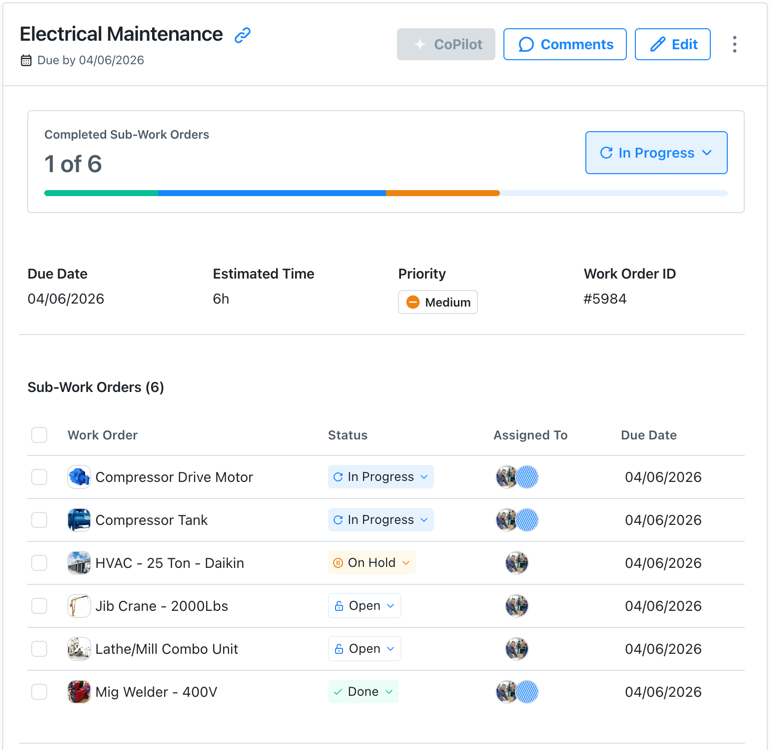
When to Use Sub-Work Orders
Sub-work orders are useful for large tasks that need to be broken down into smaller sub-tasks. For example:
- Many instances of the same asset: Your warehouse has dozens of fire extinguishers that are scheduled for inspection at the same time. You can create a sub-work order for each extinguisher and track the overall inspection effort in the parent work order.
- Line-based maintenance: You have to schedule maintenance for a full production line. You can create a sub-work order for every machine in the line, and track the overall maintenance effort in the parent work order.
- Project management or non-maintenance work: You have to schedule a facilities inspection for a compound with several buildings. You can create a sub-work order for each building and track the overall inspection progress in the parent work order.
Creating Sub-Work Orders
You can add sub-work orders to a new work order when you create it. When you save the new work order, it becomes the parent work order, and MaintainX® automatically creates the sub-work orders you added. For details, see Create and Manage Sub-Work Orders.
-
Sub-work orders inherit the following fields from the parent work order.
- Assignees (users & teams)
- Due Date & Start Date
- Work Type
- Priority
- Categories
- Vendors
-
The parent work order has a subset of the standard work order fields.
After you create a parent work order with sub-work orders:
- Changes you make to the parent work order aren't replicated in its sub-work orders.
- Changes you make to sub-work orders' start and due dates update the parent work order automatically (see Start Date and Due Date Fields).
- Some changes can only be made in the parent work order or sub-work orders, but not both.
For more information, see the next section, Parent Work Order Fields vs. Sub-Work Order Fields.
Parent Work Order Fields vs. Sub-Work Order Fields
When you create a parent work order with sub-work orders, you manage most of the work in the sub-work orders, but there are some things you track or control from the parent work order. The following table summarizes the relationship between the parent work order and its sub-work orders for key work order form fields.
| Work Order Field | Set in Parent Work Order | Set in Sub-Work Order |
|---|---|---|
| Status | ||
| Start Date / Due Date | ||
| Recurrence | ||
| Time & Cost Tracking | ||
| Assignees | ||
| Procedures | ||
| Parts |
Status
You can change the status of the parent work order and the status of each sub-work order.
- When you update a sub-work order's status, it updates the progress bar in the parent work order.
- When you set the parent work order's status to Done, MaintainX changes the status of any sub-work orders that haven't been completed or canceled to Done as well.
- Setting all sub-work orders' statuses to Done doesn't automatically set the parent work order's status to Done. You have to do that manually to complete the parent work order.
For more information, see Complete a Parent Work Order with Sub-Work Orders.
Start Date and Due Date Fields
In the parent work order: If you set a Start Date and/or a Due Date when you create the parent work order, all the sub-work orders inherit them.
After you create the parent work order, you can't edit its Start Date or Due Date. You can only change the dates in the sub-work orders.
In the sub-work orders: After you create the parent work order, if you change the Start Date or Due Date for any of the sub-work orders, MaintainX adjusts the parent work order's Start Date and Due Date accordingly.
For example, if you create a parent work order with a due date of June 25th, all sub-work orders inherit that date. If you later change a sub-work order's due date to July 1st, the parent work order's due date automatically updates to July 1st as well.
For more information about start dates and due dates, see Set Work Order Start Dates and Due Dates.
Recurrence Fields
You can only set Recurrence options for the parent work order. MaintainX hides the Recurrence options in sub-work orders.
For more information about recurrence, see Set Work Order Recurrence.
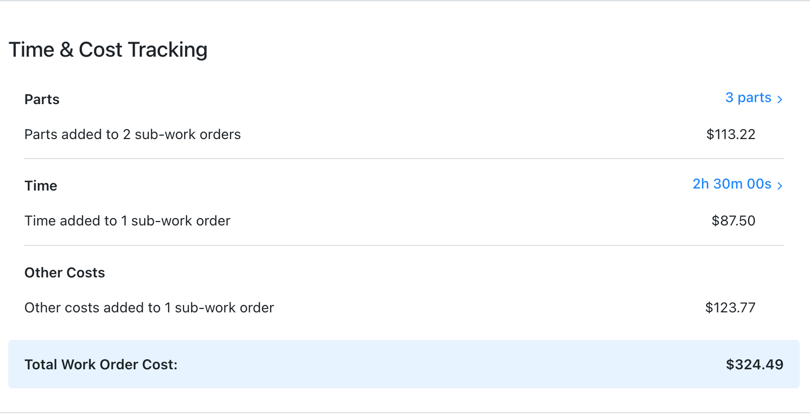
Time & Cost Tracking Fields
You can only add Time & Cost Tracking information in sub-work orders' details pages.
The parent work order details display aggregate Time & Cost Tracking information for all of its sub-work orders, and lets you drill down into breakdowns per sub-work order.
Assignees Field
Sub-work orders inherit their parent work order's assignees unless you set their assignees explicitly.
For example, if you create a parent work order with assignees and add sub-work orders:
- Sub-work orders without explicit assignees inherit the parent's assignees.
- Sub-work orders with explicit assignees don't inherit from the parent.
- Changes to parent assignees only affect sub-work orders that inherited them.
- Assignee changes for sub-work orders that inherit parent assignees break the inheritance.
- Newly added sub-work orders inherit parent assignees unless you set specific ones.
Procedures
You can only add procedures to sub-work orders.
The parent work order doesn't display any procedure information. You have to open or edit the sub-work orders to see their attached procedures.
Parts
You can only add parts to sub-work orders.
The parent work order details display aggregated parts information in the Time & Cost section. You have to open or edit the sub-work orders to see their included parts.
Tracking Progress for Sub-Work Orders
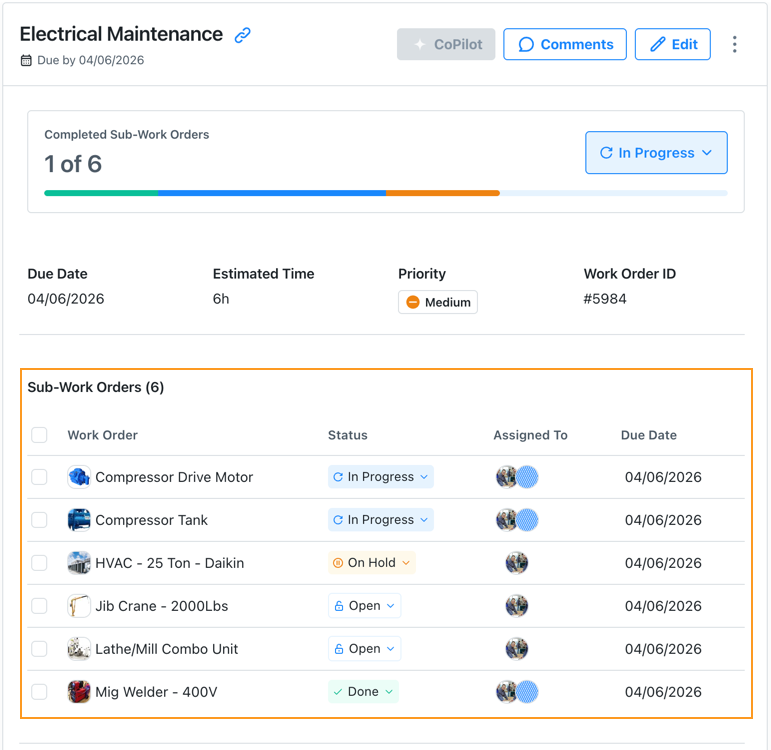
A parent work order has a progress bar that shows the overall progress of all its sub-work orders, broken down by work order status.
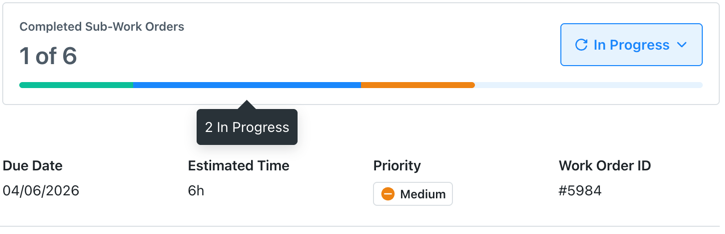
You can also track progress for sub-work orders the same way you track progress for any other work orders.
For more information, see Complete a Parent Work Order with Sub-Work Orders.
Viewing Sub-Work Orders
The different work order views have different ways of displaying sub-work orders, but they all show the relationship between sub-work orders and their parent work orders.
In the To-Do View
The list pane of the To-Do view only shows parent work orders. The number of sub-work orders appears in the list item.
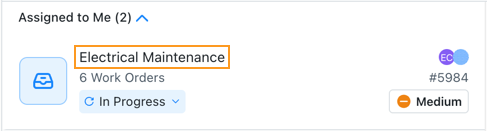
When you select a parent work order, you can see its sub-work orders in the work order details. Select any sub-work order to view its details.
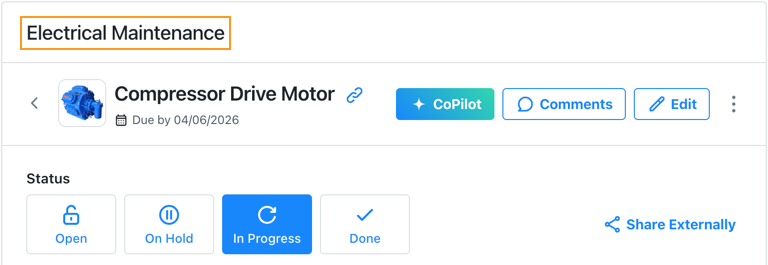
In the sub-work order's details, the parent work order's title appears at the top of the page. Select it to return to the parent work order.
In the Table View
The Table view displays rows for parent work orders and sub-work orders. Each sub-work order's Title cell displays the name of its parent work order.

In the Calendar View
The Calendar view shows parent work orders and sub-work orders on their due dates.
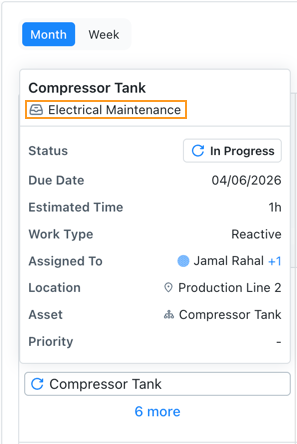
In the MaintainX web application, you can hover over a sub-work order to see the name of its parent work order.
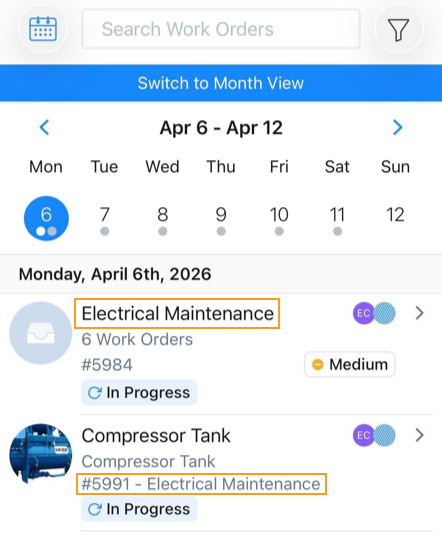
In the MaintainX mobile application, a sub-work order's Calendar view entry displays the name of its parent work order.
Exporting Parent and Sub-Work Orders
Data Exports
Work order data exports have specific columns for parent and sub-work order information. For example, you can export the name and ID of a sub-work order's parent work order. For more information, see Work Order Exports.
PDF Exports
PDF exports of parent and sub-work orders include the following information:
- When you export a parent work order, the PDF includes a list of its sub-work orders.
- When you export a sub-work order, the PDF header includes the parent work order's title.
For more information, see Export a Work Order to PDF.
Parent and Sub-Work Orders and Work Order Sharing
If your plan includes external work orders, you can share sub-work orders the same way you share any other work order. You can't share the parent work order with external contributors.