About Maintenance Plans
Planning preventive maintenance (PM) at scale can be challenging. MaintainX® maintenance plans provide a dedicated planning layer that gives you greater control over recurring work.
A maintenance plan defines the recurrence rules for PM tasks and controls when work orders are generated. By separating planning from execution, maintenance plans help ensure that the right work is created at the right time. This structure also makes it easier to safely edit or delete maintenance plans without disrupting your overall maintenance schedule.
PM plans are essential because they:
- Standardize how preventive maintenance is scheduled and tracked.
- Improve reliability by ensuring recurring work happens on time.
- Provide flexibility to adjust plans without losing historical accuracy.
- Reduce downtime and extend asset life through consistent upkeep.
Understanding the Concepts of Fixed and Floating Intervals
Fixed and Floating intervals determine how MaintainX schedules future maintenance work orders based on time, usage, or a combination of both.
Fixed Intervals
Fixed intervals follow predetermined maintenance milestones that do not change over time. MaintainX schedules maintenance at specific dates or meter readings, regardless of whether previous work was completed early or late. Future work orders are generated according to the original schedule rather than the completion date of the previous work order. Because fixed intervals follow predetermined milestones, multiple work orders can be open at the same time.
For calendar-based maintenance (Time based schedule type), MaintainX generates work orders at fixed time intervals, such as every Friday, every month, or every three months. For example, a vehicle may require an inspection every Friday or preventive maintenance every three months.
For usage-based maintenance (Usage based schedule type), MaintainX schedules maintenance at specific meter readings, such as 5,000, 10,000, or 15,000 miles. These milestones remain fixed even if you complete previous work earlier or later than expected.
Use fixed intervals when work must occur at specific dates or usage milestones, such as manufacturer recommendations, warranty requirements, or regulatory standards.
Floating Intervals
Floating intervals allow you to use calendar-based schedules, usage-based schedules, or a combination of both within the same maintenance plan. MaintainX generates a work order when the time interval or usage threshold is reached, whichever comes first. After completing a work order, MaintainX uses the completion date or completion meter reading as the starting point for calculating the next maintenance interval, allowing the schedule to adjust based on actual maintenance activity.
For example, you might schedule maintenance every three months or 5,000 miles, whichever comes first. If the asset reaches 5,000 miles before three months have passed, MaintainX generates the work order based on the meter reading. Because floating intervals are based on the most recently completed work order, MaintainX attempts to keep only one work order open at a time and recalculates future maintenance targets when the work order is completed. If three months pass before the asset reaches 5,000 miles, MaintainX generates the work order based on the calendar schedule.
Use floating intervals to ensure maintenance occurs based on either elapsed time and asset usage, helping prevent overuse while maintaining regular service intervals.
For more information, see Create a Maintenance Plan.
Nested Preventive Maintenance
Nested preventive maintenance, or nested PM, lets you manage multiple recurring maintenance work orders with different schedules within a single maintenance plan. Vehicle maintenance is a good example of nested PM plans in action because vehicles require regular maintenance on different schedules:
- Every month: Perform a routine inspection.
- Every three months: Perform the routine inspection and check for issues or damage.
- Every six months: Complete the three-month inspection and replace the air and oil filters.
- Every nine months: Perform the three- and six-month maintenance tasks and replace the cooling fluid.
- Every twelve months: Complete all previous inspections and replacements, and clean the brakes.
Each maintenance activity needs a work order with different tasks and criteria. Nested PM plans let you define overlapping maintenance needs in one place, so each work order includes the right tasks at the right time.
In a year, the vehicle will have 12 recurring work orders. Every third work order includes additional tasks.
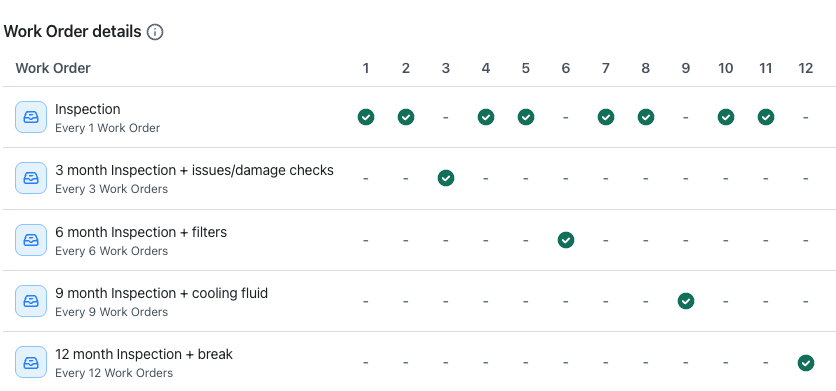
Nested PM plans help you manage complex maintenance schedules without manual work or the risk of missing critical tasks. When you model overlapping maintenance requirements in advance, each work order includes the right inspections and repairs at the right time. This cuts down on planning time, prevents errors, and keeps your assets running safely as maintenance needs grow more complex.
For more information, see Create a Nested Preventive Maintenance Plan.
How Maintenance Plans Help Preventive Maintenance Planning
With maintenance plans, your organization's planners are no longer limited to managing only the current open instance of a recurring work order. Instead, they can schedule and adjust upcoming work in advance—reassign tasks, shift dates around constraints, or skip unnecessary maintenance—without impacting the plan or other work orders in the series.
Maintenance plans also address the challenges of managing default settings for recurring work orders. Instead of editing the latest work order instance to update shared settings, planners can define recurrence rules and default details in the plan. This ensures consistency across all future work orders and reduces errors.
By centralizing control, maintenance plans streamline preventive maintenance planning and ensure the right work happens at the right time.
Work orders generated from maintenance plans are non-recurring, but have their Work Type set to Preventive to indicate that they're part of a preventive maintenance plan.
How Dates Work with Maintenance Plans
When you set up a maintenance plan, you need to set a start date, a due date, and a scheduling horizon.
Due Date and Start Date
A maintenance plan's due date is the anchor for the maintenance plan. It represents the due date of the first work order and determines how all future work orders are scheduled. Each new work order generated by the plan follows the planned due date of the last created work order.
The start date is calculated based on an offset from the due date that you specify. For example, if you set a start date offset of two days, the start date for each generated work order will be two days before its due date.
Scheduling Horizons
A scheduling horizon is a planning layer based on a defined time frame. With a scheduling horizon, you configure how far ahead you want to plan work orders in a maintenance plan, such as the next few days or weeks. MaintainX then generates future work orders based on projected due dates, regardless of whether earlier work orders are open, overdue, skipped, or canceled. This approach gives you more reliable visibility into upcoming work and helps teams plan proactively instead of reacting to one work order at a time.
For more information, see Modify a Scheduling Horizon.
When Should I Use Maintenance Plans Instead of Recurring Work Orders?
You can use both maintenance plans and recurring work orders, depending on how you schedule and track preventive maintenance. Recurring work orders are recommended for hierarchical work orders (parent and sub-workers) and time or meter-based schedules.
Maintenance plans and recurring work orders can be used at the same time, and neither restricts the other. Both methods generate work orders that you can schedule and manage in MaintainX.
Custom Role Permissions for Maintenance Plans
Administrators can create custom roles and grant maintenance plan permissions to specific users within their organization. For details, see Custom Role Permissions Quick Reference.