About Global Organizations
Companies on an Enterprise plan that have more than one MaintainX® organization can set up Global Organizations to monitor and manage them. This article introduces Global Organizations, sub-organizations, and the Global Leader role, and helps you determine if a Global Organization is right for your enterprise.
Global Organizations Overview
A Global Organization is an umbrella organization for your enterprise's individual sub-organizations. For example, let's say you have two manufacturing plants and two distribution centers, each in different cities. You can set up a MaintainX organization for each facility, and connect them with a Global Organization.
A sub-organization is an individual MaintainX organization that belongs to and can be managed within a Global Organization. Each sub-organization represents a separate operational entity, such as a facility, plant, or site, while remaining connected through a single Global Organization.
The Global Organization provides a central place to monitor and manage the sub-organizations.
What Is the Global Leader User Role?
A Global Leader is a MaintainX user role that's specifically for Global Organizations. Global Leaders are the only users who can access Global Organizations and use global features. Think of them as Global Organization Administrators.
- Global Leaders can monitor and manage all the enterprise's sub-organizations via the Global Organization, whether they are members of those sub-organizations or not.
- A Global Leader can also be a member of one or more of the enterprise's sub-organizations. In that case, they can see and access those sub-organizations from the organization picker in the sidebar of the MaintainX web application.
Is a Global Organization Right for You?
A Global Organization is best suited for Enterprise customers that operate multiple locations and want a centralized view of their operations while ensuring consistent maintenance processes and standards across every site.
A Global Organization may be the right fit if your organization:
- Operates multiple sites with the same maintenance practices. Your locations share similar asset types, work order categories, procedures, naming conventions, and maintenance standards.
- Wants to standardize processes across all locations. You want to define standards once and apply them consistently across every sub-organization.
- Benefits from company-wide visibility. Global Leaders need visibility into maintenance activities across all sub-organizations instead of viewing each site independently.
- Plans to scale using a proven operational model. You have an established site whose configuration serves as the foundation for new locations, making it easy to replicate processes and standards across your organization.
If your goal is to maintain consistent maintenance operations across multiple locations while managing standards from a central place, a Global Organization is likely the best fit.
For more information on the different global features available, see Global Organization Features.
How to Set Up a Global Organization
To set up a Global Organization, contact your MaintainX representative. They can create a Global Organization for your enterprise, and assign the Global Leader user role to specific users.
Access a Global Organization
To access a Global Organization, you must have a Global Leader user role. In the web application, MaintainX splits the organization picker in the sidebar into sections labeled Global Organization and Sub-Organization.
To open the Global Organization, select it the way you would any other organization.
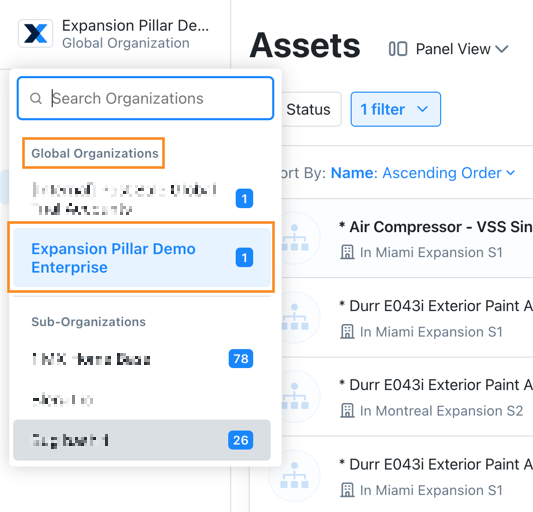
The Global Leader user role doesn't make you a member of your enterprise's sub-organizations automatically. That means you'll only see the sub-organizations that you're a member of in the organization picker.