About the Kepware IoT Gateway Connector
| Platform: | AvailableWebNot availableMobile |
|---|---|
| Plan Type: | Not availableBasicNot availableEssentialAvailablePremiumAvailableEnterprise |
| User Type: | Not availableRequesterNot availableFull UserAvailableAdministrator |
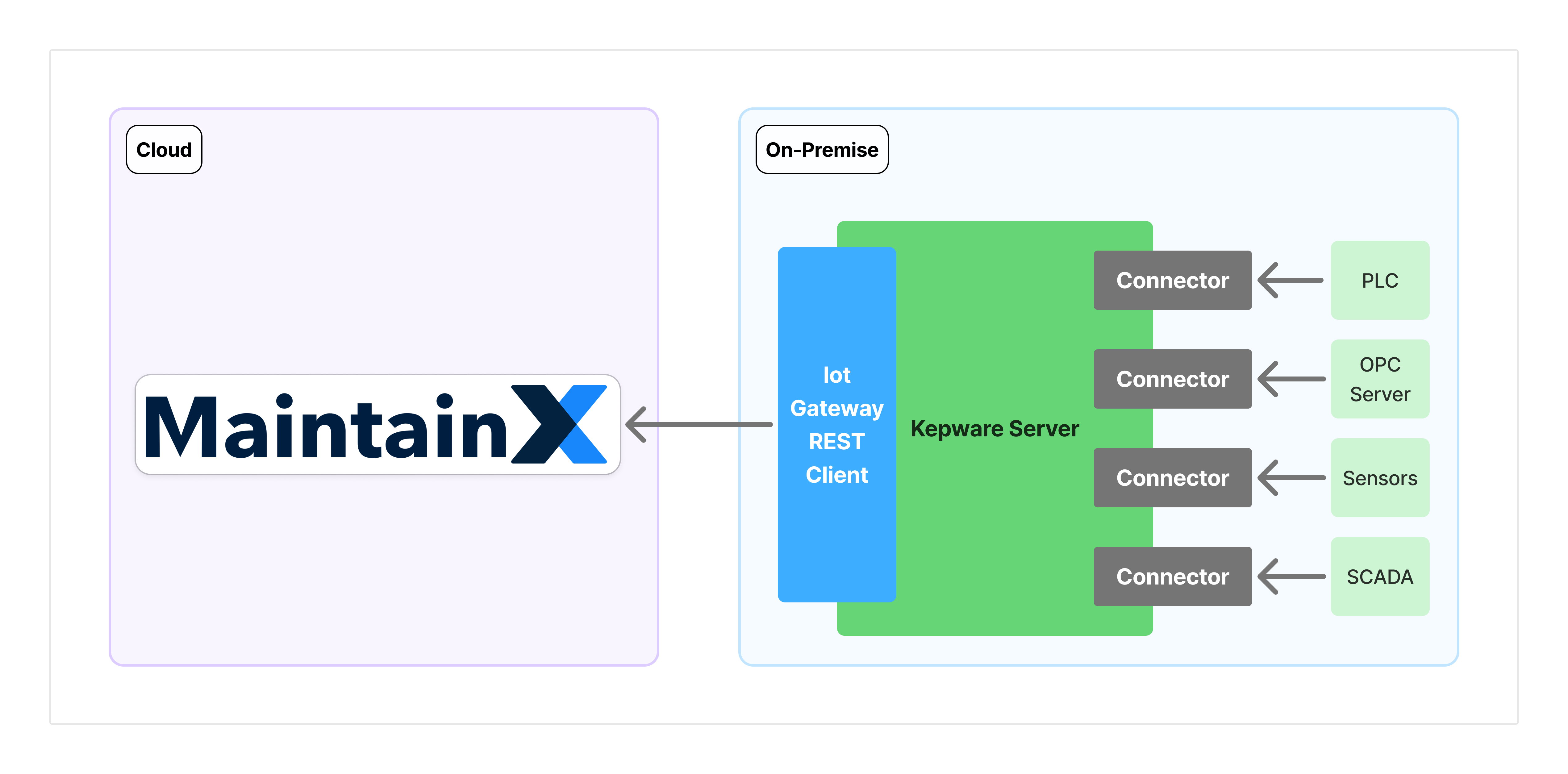
The Kepware IoT Gateway connector lets you stream real-time tag data from your Kepware ServerEx6 into MaintainX®. The Kepware IoT Gateway REST Client agent (referred to as the Kepware agent) pushes tag readings directly to the MaintainX platform over HTTPS, where you can map tags to meters and set up thresholds to trigger work orders, notifications, and alerts.
Requirements
On-Premise
-
Kepware ServerEx6: A licensed version of Kepware ServerEx6 running.
-
Kepware IoT Gateway Plugin: A licensed version of the IoT Gateway Plugin installed and running. For more information, see the Kepware IoT Gateway Plugin documentation.
-
Network: Ensure that outgoing network traffic from the Kepware host system can reach the MaintainX agent endpoint for your region on port 443:
Region Endpoint US1 (United States) https://agent.maintainx.com/EU1 (Europe) https://agent.eu1.maintainx.com/For guidance on identifying your region, see Choose Your Region.
MaintainX Account
- Connector permissions: Contact your organization's Administrator to request access to the OT data connectors feature.
Key Concepts
The following concepts are referenced across the Kepware documentation. Understanding these terms will help you through the setup guide and configuration steps.
Connector Instances
A connector instance is a link between one Kepware ServerEx6 deployment and your MaintainX organization. Each instance has its own unique access token that authenticates Kepware's requests with the MaintainX platform.
Multiple connector instances per organization are supported, so you can connect Kepware servers across different facilities or sites. Each instance must have its own token; tokens aren't shared between instances.
Kepware Agent
The Kepware IoT Gateway Plugin includes several agent types for pushing data to external systems. MaintainX uses the REST Client agent type, which sends tag readings to MaintainX as HTTPS POST requests at a configurable interval.
Throughout this documentation, "Kepware agent" refers specifically to the REST Client agent type within Kepware's IoT Gateway Plugin. The IoT Gateway also supports other agent types, such as the MQTT Publisher. Those types aren't used for the MaintainX integration, though customers running Kepware for other purposes may have them configured alongside the REST Client agent. On the MaintainX side, only the REST Client agent type is supported, so this distinction doesn't affect MaintainX product behavior.
The Kepware agent initiates all communication outbound to MaintainX. MaintainX never sends requests into your network, so no inbound firewall rules are required. For more information on the security model, see Architecture Overview.
Tags and Tag Hierarchy
Kepware organizes data into three levels:
- Channel: A communication pathway configured with a specific driver (protocol and network settings).
- Device: A specific piece of hardware within a channel, such as a PLC or sensor, identified by its network address.
- Tag: A reference to a specific data point on a device, such as a sensor reading or control parameter.
The full Channel.Device.Tag path is used as the tag identifier when MaintainX receives a reading. For example, a tag at McHenryPLC.101-11.HopperGate will appear in MaintainX under that name. Understanding this hierarchy helps you interpret tag names in the MaintainX interface and when using smart tag mapping.
Narrow and Wide Format
The Kepware agent transmits tag readings in one of two modes:
| Format | Behavior |
|---|---|
| Narrow Format | Sends only tags whose value or quality has changed since the last scan. |
| Wide Format | Sends all enabled tags in the agent on every scan, regardless of whether values have changed. |
Using Narrow Format is strongly recommended. Wide Format can generate many events per transmission, increasing the risk of exceeding rate limits.
Rate Limiting
MaintainX enforces a hard limit of 1,000 events per transmission. Payloads that exceed this limit are rejected by the platform.
The number of events in each transmission is affected by:
- The number of tags added to the Kepware agent.
- The Scan Rate configured per tag: how frequently Kepware samples each tag value.
- The Kepware agent's Rate (ms) setting: how frequently the agent sends a POST to MaintainX.
- Whether Narrow or Wide Format is used.
For recommended settings that keep transmission sizes within limits, see Add Tags to the Kepware Agent.