About the MQTT On-Premise Agent
| Platform: | AvailableWebNot availableMobile |
|---|---|
| Plan Type: | Not availableBasicNot availableEssentialAvailablePremiumAvailableEnterprise |
| User Type: | Not availableRequesterNot availableFull UserAvailableAdministrator |
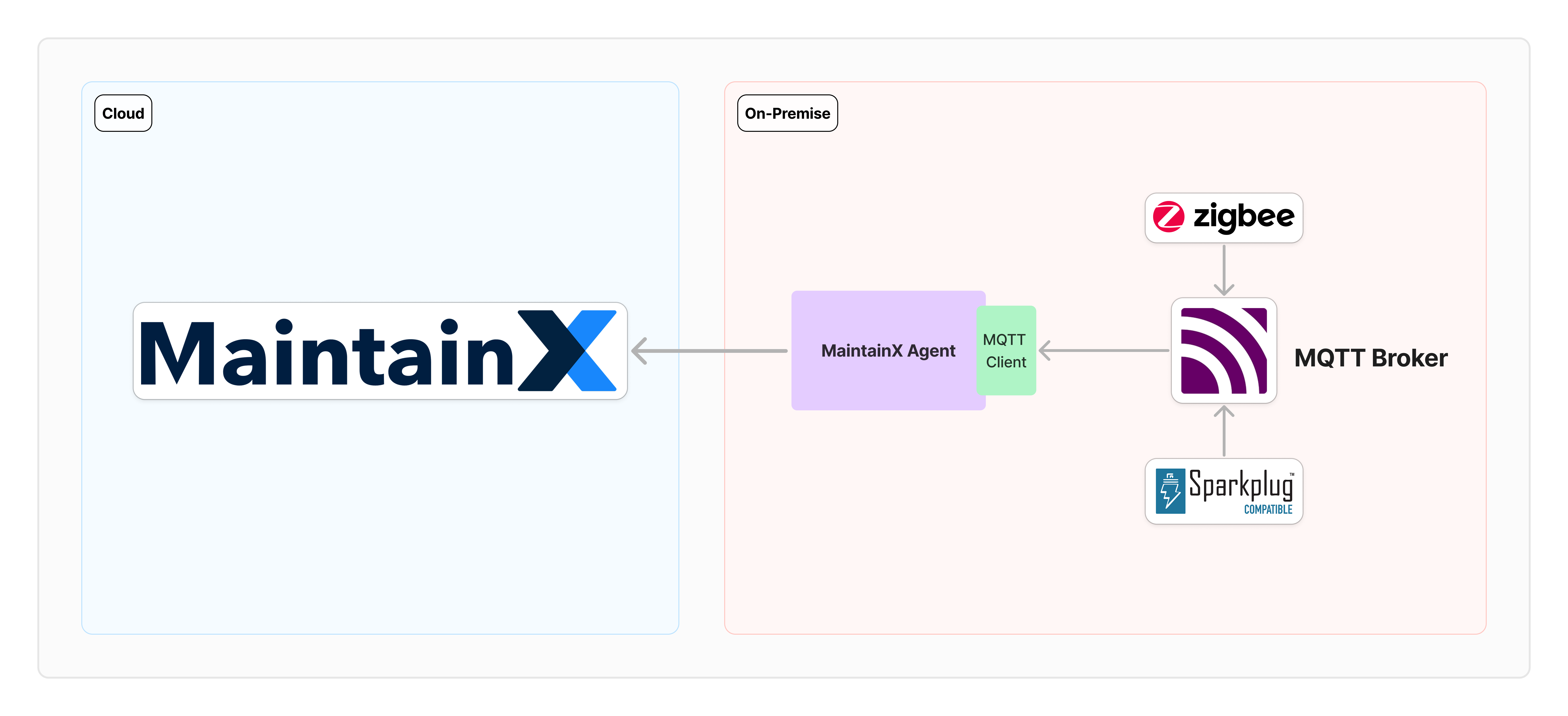
The MaintainX® On-Premise Agent (OPA) connects an MQTT broker to the MaintainX platform so you can see data from your connected sensors in the MaintainX application.
Requirements
Host System
- Operating system: Any operating system with support for Linux-based containers.
- Software: Container runtime such as Docker installed. For more information, see the Docker Installation Guide.
- Network: Ensure that the outgoing network traffic from the host system can access https://agent.maintainx.com/ on port 443.
MQTT Broker
- A messaging broker that uses the MQTT protocol. It receives and publishes messages from different systems such as Sparkplug, Majik or AWS IoT Core.
- Network: Ensure that the MQTT Broker is accessible from the host system.
MQTT Clients
- One or more MQTT clients that publish data to the broker. The OPA reads flat (custom) MQTT topics, Sparkplug B, and Zigbee2MQTT. For how each maps to a subscription, see Subscription Types.
MaintainX Account
- Integration Connectors permissions. Please contact your organization's Administrator to request access to the OT data connectors feature.
Key Concepts
The following concepts are referenced across the MQTT documentation. Understanding these terms will help you through the setup guide, subscription configuration, and troubleshooting.
Subscriptions
The OPA connects to your broker but doesn't subscribe to any topics until you tell it which ones to listen to. You declare subscriptions in the MqttSubscriptionSettings block of settings.json. Each subscription pairs an MQTT topic pattern with rules that tell the OPA how to turn incoming payloads into tag readings.
For each subscription, you choose:
- The MQTT topic pattern (with optional
+wildcards). - How to decode the payload:
Raw(one value per topic) orJson(extract one or more fields). - The data type for each value: explicit (
Number,String,Boolean) orAutoto let the OPA infer the type from the payload.
For the full configuration schema and worked examples, see Configure MQTT Subscriptions.
Subscription Types
The OPA supports the following subscription types:
SubscriptionType | When to Use |
|---|---|
Custom | Any MQTT broker. You control topic patterns, payload decoding, and field mapping. |
Sparkplug | Brokers using the Sparkplug B specification. |
Zigbee2MQTT | Brokers fronting a Zigbee2MQTT bridge. |
The Custom type is the most flexible and applies to any MQTT broker. For details, see Configure MQTT Subscriptions.
Payload Encoding
Each subscription decodes its payload as either Raw (the entire payload is a single scalar value) or Json (the payload is a JSON object from which the OPA extracts one or more fields). For details, see Payload Encoding.
Automatic Type Inference
Type: "Auto" lets the OPA decide a tag's data type from the payload itself, instead of forcing you to declare it up front. It works for both Raw and Json encodings. For details, see Type Auto: Automatic Type Inference.
Data Type Locking
A tag's data type is set on first creation and never updated afterward. If a later payload for an existing tag has a different type than the one stored at creation, the OPA drops the payload. For details, see Data Type Locking.
Tag Naming
The OPA derives each tag's name from a combination of the received topic and the field configuration. For the full set of rules, see the Tag Naming Matrix.
Overlapping Subscriptions
When more than one subscription's topic pattern can match the same incoming topic, including overlaps between wildcard and literal patterns, the OPA uses only the first matching subscription and ignores the others. For more information, see Overlapping Subscriptions.