Smart Hub Inbox
| Platform: | AvailableWebNot availableMobile |
|---|---|
| Plan Type: | Not availableBasicNot availableEssentialNot availablePremiumAvailableEnterprise |
| User Type: | Not availableRequesterAvailableFull UserAvailableAdministrator |
The Smart Hub inbox brings together the results generated by AI-powered skills, such as summaries, reports, insights, tasks, or recommendations.
Depending on the skill and output, you can:
- View a report or summary.
- Edit generated content.
- Approve or reject a suggested action.
- Archive an output.
Outputs that suggest changes require your approval. For more information, see Built-In Safeguards.
AI-generated outputs may contain errors. Always review their findings before approving any suggested changes.
Access the Smart Hub Inbox
From the sidebar, select Smart Hub > Inbox.
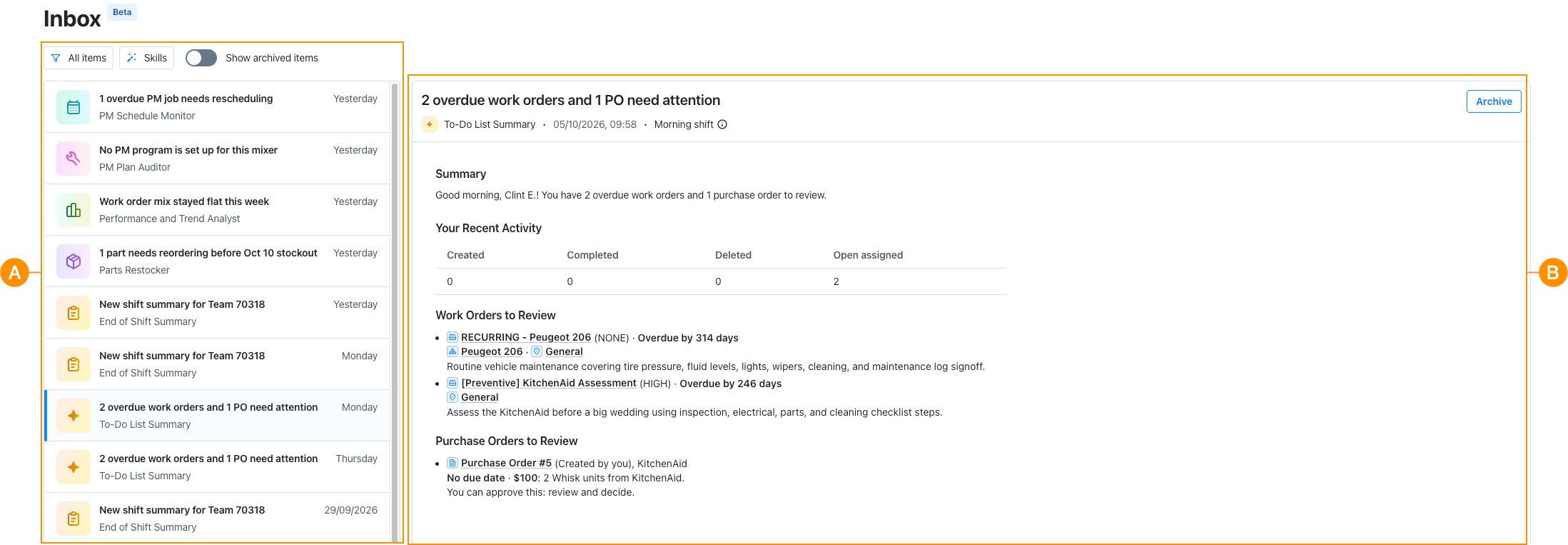
The Smart Hub inbox has two areas:
- An output list A, where you can search through skill outputs and filter the list.
- A review panel B, where you can review a selected output and act on it.
Output List
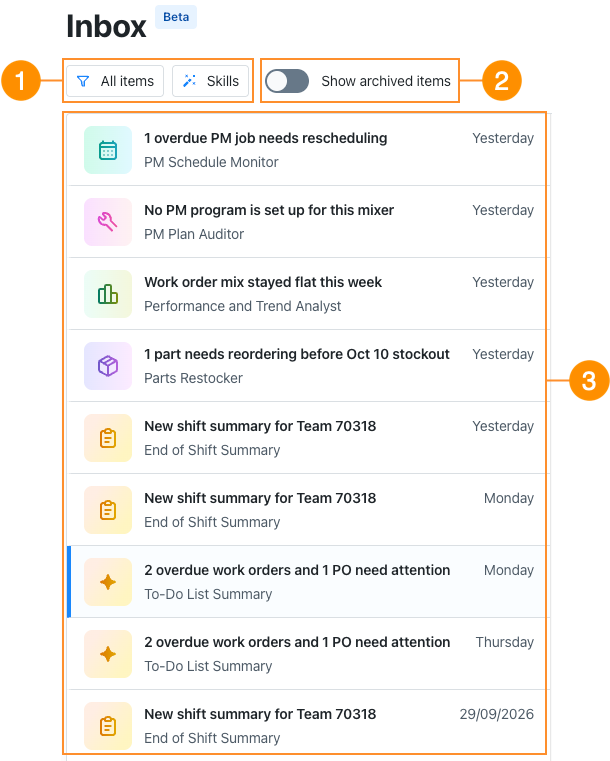
The output list gathers all the outputs generated by your skills. Use the options above the list filter the outputs you want to review.
| Description | |
|---|---|
| 1 | Options to filter the inbox:
|
| 2 | Option to show archived outputs. For more information, see Access an Archived Output. |
| 3 | List of all skill outputs. |
Review Panel
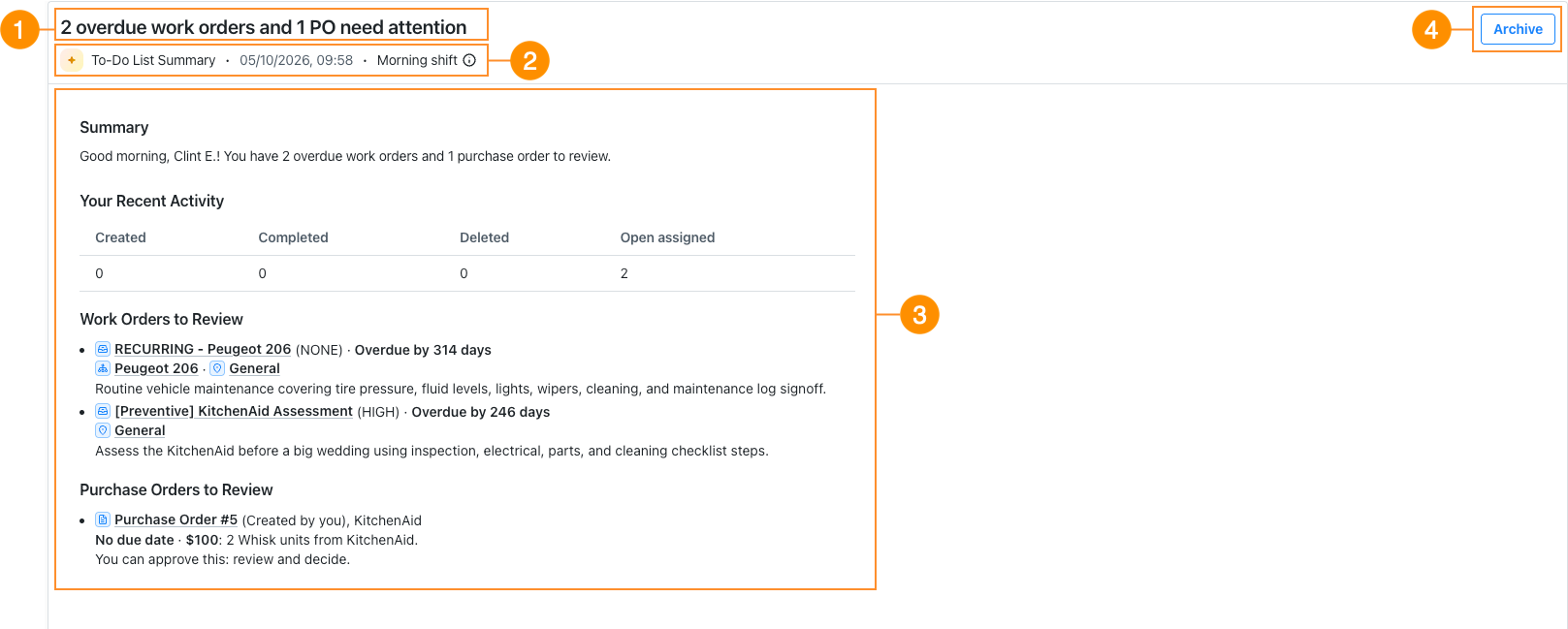
The review panel shows the details of a selected output. Use it to review the output, check its run details, and decide what to do next.
| Description | |
|---|---|
| 1 | The output name. |
| 2 | Information about the skill configuration:
|
| 3 | Details of the skill output. The available actions depend on the skill. For more information, see the Review section of the skill's article. |
| 4 | Option to archive the output. For more information, see Archive a Skill Output. |
Manage Skill's Outputs
Open an Output
When a skill finishes running, you receive a notification that its output is ready. To open the output, do one of the following:
- Select the notification at the bottom of your screen.
- In the skill's Activity tab, select View Details for the run.
Both options open the output in the Smart Hub inbox.
You can also open an output from the output list at any time.
Archive an Output
After you review an output, you can archive it to keep your inbox focused on outputs that still need your attention.
- From the sidebar, select Smart Hub > Inbox. The Smart Hub inbox opens.
- Locate the skill output and select it to open its details.
- Select Archive. A confirmation dialog appears.
- Select Archive. The output no longer appears in Smart Hub inbox.
You can still access an output after archiving it. For more information, see Access an Archived Output.
Access an Archived Output
Archived outputs stay available, you can access them in the Smart Hub inbox. You can't restore an archived output.
- From the sidebar, select Smart Hub > Inbox. The Smart Hub inbox opens.
- Select Show archived items. Archived outputs appear on the screen.
- Locate the archived output you want to review.
- Select the output. The output's details appear on the screen.
Share Feedback on an Output
In an output details, select or and share feedback to tell us what worked well, what was inaccurate or missing, or how it could be improved.