What's in a Service Report
MaintainX® builds a service report from the information in a completed work order. This article describes each section of a generated service report, in the order it appears.
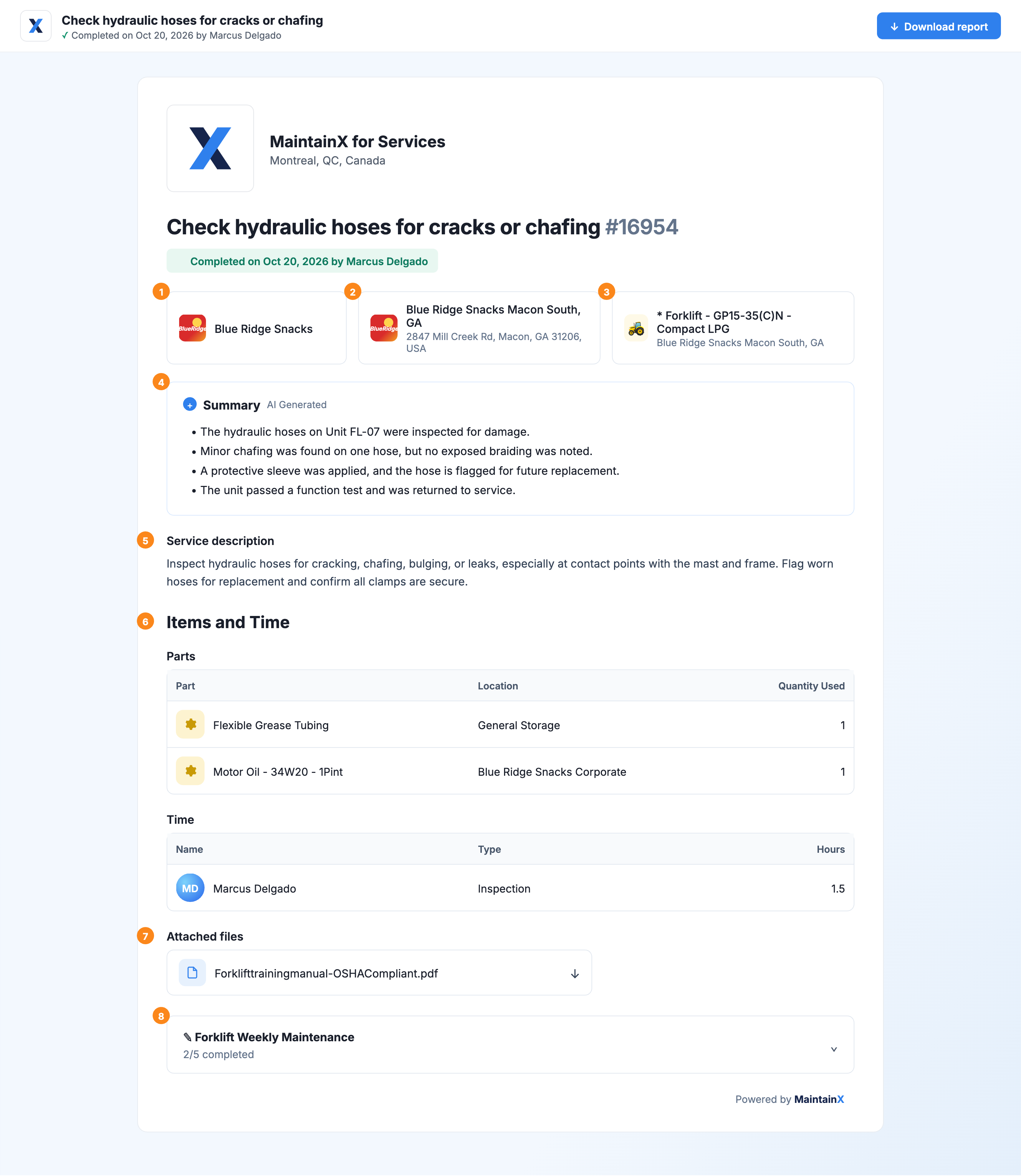
| Section | |
|---|---|
| 1 | Customer |
| 2 | Location |
| 3 | Asset |
| 4 | Work Order Summary |
| 5 | Service Description |
| 6 | Items and Time |
| 7 | Attachments |
| 8 | Procedure |
Administrators control which sections appear in generated service reports. For more information, see Service Report Settings.
Customer
The report shows the customer the work order is linked to, clearly identifying the account the service call is for.
Location
The report gives the specific address where the work was performed, helpful for customers with multiple sites or facilities.
Asset
The report shows the asset the work was performed on, so the customer can tie the service call to a specific piece of equipment in their records.
Work Order Summary
The work order summary is only available on Enterprise plans, and requires MaintainX Assist to be enabled for your organization.
The report includes a summary of the work performed. The summary is written for your customer, describing what was done and the outcome of the work order.
Review the summary before you share the report to make sure it reflects the work accurately.
Service Description
The service description gives the customer the details of the service call, usually what work was requested and the work performed.
Internal comments on the work order stay internal. The report only includes information intended for the customer.
Items and Time
This section lists the parts used to complete the job and the time your team spent on it. It gives the customer a clear record of materials and labor.
The report shows quantities and hours only. Actual costs for parts and labor are hidden from the customer.
Attachments
Photos and files attached to the work order appear in the report. Attachments are useful for before-and-after photos, inspection results, or any other documentation that supports the work performed.
Procedure
If the work order includes a procedure, the report shows each step and its result in a condensed checklist view. Steps are collapsed by default to keep the report compact. The customer can expand any step to see the details, such as readings, checkbox results, technician responses, and signature sign-offs.
Download the Report as a PDF
Customers can download a PDF version of the report from the report page. The PDF is a print-ready version of the same content.
Service report links expire 30 days after they're sent. The customer can download the PDF to keep a permanent copy.