Report Builder's Known Limitations
| Platform: | AvailableWebNot availableMobile |
|---|---|
| Plan Type: | Not availableBasicNot availableEssentialNot availablePremiumAvailableEnterprise |
| User Type: | Not availableRequesterNot availableFull UserAvailableAdministrator |
Report Builder is a MaintainX® feature that enables you to create custom reports using your operational data. While Report Builder supports a range of use cases, it's subject to functional limitations that impact how data can be filtered, calculated, or presented.
This article highlights the general limitations of Report Builder and the specific limitations associated with its extended capabilities, such as Report Builder AI and Global Report Builder.
General Limitations
Report Builder is subject to general limitations that impact its core capabilities, but also Report Builder AI and Global Report Builder.
Data Refresh Delays
Report Builder refreshes data approximately every hour. If you update data shortly before creating a custom report, those changes may not be reflected in the report.
Formula Limitations
- Before adding a formula, you need to add at least one column to the report.
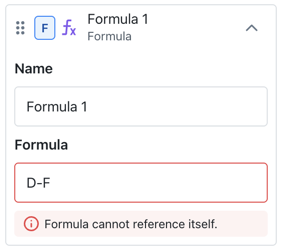
- You can't reference formula columns within formulas.
-
Report Builder only supports basic calculations, such as:
- addition
A + B - subtraction
A - B - multiplication
A * B - division
A / B
noteTimestamp values only support subtraction operations, which produce a duration value.
- addition
-
Functions like absolute value, standard deviation, rounding, or percentage change aren’t supported.
-
Formulas support a maximum of 10 operations.
For details, see Formulas and Calculations.
Filter Limitations
Date Limitations
-
Date filters only support filtering by:
- Time ranges:
Due date within the last 30 days,Work orders from the last 6 months,Completed between January and March. - Named periods:
Last month,last quarter,this year. - Field checks:
Due date is set,Due date isn't set.
- Time ranges:
These are supported as they define a clear start and end date.
-
Prompts that use filters with a single point in time, without a clear date range, aren't supported. For example:
Overdue work ordersDue date has already passedCreated after March 1stDue date more than 30 days agoAssets not inspected since January
-
When you prompt Report Builder AI with a time constraint, make sure the filters fit the following structure:
- Between two dates.
- Date
is set/is not set.
Time Limitations
You can't filter by specific hours (e.g., 5 AM to 5 PM or overnight shifts).
Report Builder AI Limitations
Report Builder AI is subject to the same limitations as the Report Builder. For details, see General Limitations. It also has additional limitations related to its AI functionality.
-
AI-generated reports may contain inaccuracies. Always review results before sharing them.
-
The AI engine can't download, schedule, or distribute reports. These actions must be performed manually.
-
By default, the AI engine generates table reports. You can:
- Change the report visualization after the report is built.
- Mention the desired visualization directly in the prompt.
Example: Show parts usage by consumption cost in a pie chart.
AI Chat Limitations
The Report Builder AI Chat:
-
Only has access to data available in Report Builder. It can't access data from other features in the Reporting module or from any other MaintainX module.
-
Can't edit saved custom reports, including reports added to dashboards.
-
Doesn't keep conversation history. Once you close the chat, you can't access previous conversations.
-
Doesn't support contextual data for certain organization-specific fields, including:
- Work order categories
- Asset statuses
Ratio-Based Metrics
A ratio is a mathematical operation that compares two values, by showing how one relates to the other (e.g., this month vs last month).
Report Builder AI can’t calculate ratio-based metrics directly as they require combining multiple aggregations (e.g., dividing one calculated value by another).
As a result, common performance metrics such as PM Compliance, Mean Time To Repair (MTTR), Mean Time Between Failures (MTBF), and Overall Equipment Effectiveness (OEE) are not supported.
Workaround
To calculate a ratio, you will need to compute each value separately and compare them manually. For example, if you want to compare total asset downtime this month vs. last month:
- Prompt Report Builder AI to calculate the asset downtime for this month.
- Prompt it again to calculate the total asset downtime last month.
- Write down the values.
- Manually compare the total value.
Metric Limitations
Report Builder AI only supports simple aggregations, such as Count, Sum, and Average. It doesn't support more advanced calculations that require combining or comparing multiple datasets. Additionally, all KPI-like or calculated metrics, such as Marketing or Finance KPI reports, aren't supported.
This limitation shows up in two ways:
Ratio-Based Metrics
Report Builder AI can't calculate metrics that require dividing one value by another, even when both come from the same dataset.
Example: What percentage of work orders were completed vs. total?
This requires calculating completed work orders ÷ total work orders, which involves two separate aggregations. As a result, commonly used performance metrics such as PM Compliance, Mean Time To Repair (MTTR), Mean Time Between Failures (MTBF), and Overall Equipment Effectiveness (OEE) aren't supported, since they depend on ratio-based or multi-step calculations.
Dual-Filter Comparisons
Report Builder AI can't handle requests that require comparing two datasets with different filter combinations within a single report.
Example: Show reactive work orders from Site A vs. preventive work orders from Site B.
This requires two independent filter sets:
- Location: Site A + Work Type: Reactive
- Location: Site B + Work Type: Preventive
Report Builder AI can't simultaneously apply these filters in one query.
Global Report Builder Limitations
Global Report Builder is subject to the same limitations as the Report Builder. For details, see General Limitations. It has additional limitations related to its global functionality.
-
You can view only specific entities' details if they belong to a sub-organization you have permission to view:
- Location
- Manufacturer
- Model
- Part
- Purchase order
- Request
- Tag
- Team
- Vendor
- Work order
-
You can't select Users.
-
Entities from different sub-organizations might have the same name. Use the Organization column to distinguish them.