On Time vs. Overdue Report
| Platform: | AvailableWebNot availableMobile |
|---|---|
| Plan Type: | AvailableBasicAvailableEssentialAvailablePremiumAvailableEnterprise |
| User Type: | Not availableRequesterNot availableFull UserAvailableAdministrator |
The On Time vs. Overdue report tells you how many work orders in the date range are past their due date, and how many are still on time.
Where to Find This Report
The On Time vs. Overdue report is available on the Work Orders and Reporting Details screens.
Report Source
The On Time vs. Overdue report includes all work orders that have a due date within the date range, after any active filters are applied.
Data and Charts
The On Time vs. Overdue report includes the following data and charts.
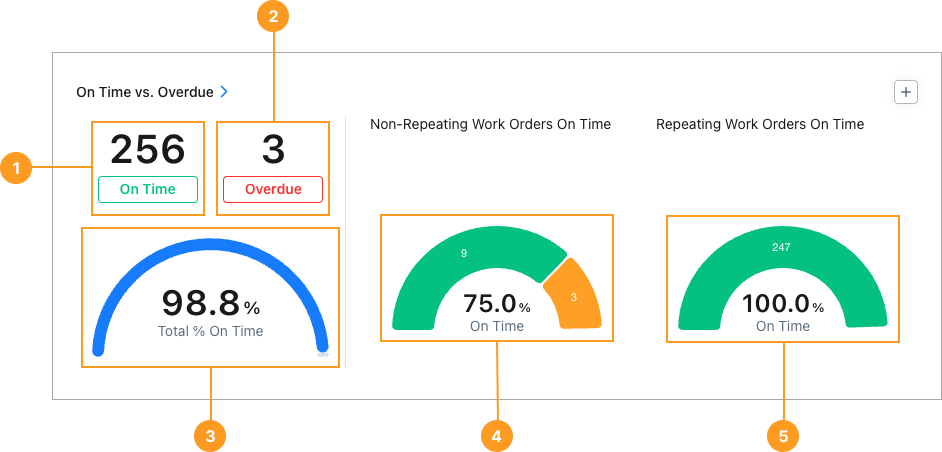
Statistics
| Stat | Description | Action | |
|---|---|---|---|
| 1 | On Time | The total number of work orders completed on or before their due date, and non-completed work orders whose due date has not passed. | Select the total to display a list of on time work orders. Select any work order in the list to view its details. |
| 2 | Overdue | The total number of work orders completed after their due date (Done Overdue), or whose due date has passed (Not Done Overdue). | Select the total to display a list of overdue work orders. Select any work order in the list to view its details. |
| 3 | Total % On Time | The percentage of work orders in the date range that were completed on time, or whose due date has not passed. | None |
Charts
The two half-donut charts 4, 5 show breakdowns of repeating and non-repeating work orders by overdue status:
| Overdue Status | Description |
|---|---|
| On Time | Date Completed is on or before the due date, or the due date has not passed. |
| Done Overdue | Status is Done. Date completed is after the due date. |
| Not Done Overdue | Any status except for Done. Due date has passed. |
-
Hover over any segment to display the number of work orders with that priority.
-
Select any segment to display a list of work orders with that priority.
- Select any work order in the list to view its details.
Each chart also displays the percentage of On Time work orders.
The chart area also displays the percentage of non-repeating work orders that don’t have a due date, provided that the date range and filters include any such work orders.
How to Read This Report
Use the On Time vs. Overdue report to understand how well your team is meeting due dates. The key metric to watch is the ratio of On Time to Done Overdue work orders.
- A high ratio of On Time to Done Overdue work orders is high means most work is being completed by its due date.
- Reviewing the split between On Time and Done Overdue can help you distinguish between work that was completed late and work that hasn't been addressed at all.
From the sidebar, select Reporting > Reporting Details, to see Members, On Time, Overdue, Total, % On Time, and overdue status data (Done Overdue, Not Done Overdue) for work orders grouped by Asset, Location, and more.