Completed with Inspection Check Report
| Platform: | AvailableWebNot availableMobile |
|---|---|
| Plan Type: | AvailableBasicAvailableEssentialAvailablePremiumAvailableEnterprise |
| User Type: | Not availableRequesterNot availableFull UserAvailableAdministrator |
The Completed with Inspection Check report breaks down work orders according to the status of Inspection Check steps from procedures in work orders. Because a work order can include more than one procedure and more than one Inspection Check step, this report uses the following criteria to classify work orders:
Pass - the work order has:
- At least one passed inspection check.
- No inspection checks marked Fail.
Flag - the work order has:
- At least one inspection check marked Flag.
- No inspection checks marked Fail.
Fail - the work order has:
- At least one inspection check marked Fail.
Where to Find This Report
The Completed with Inspection Check report is available on the Work Orders and Reporting Details screens.
Report Source
The Completed with Inspection Check report includes all work orders completed within the date range, after any active filters are applied.
Data and Charts
The Completed with Inspection Check report includes the following data and charts.
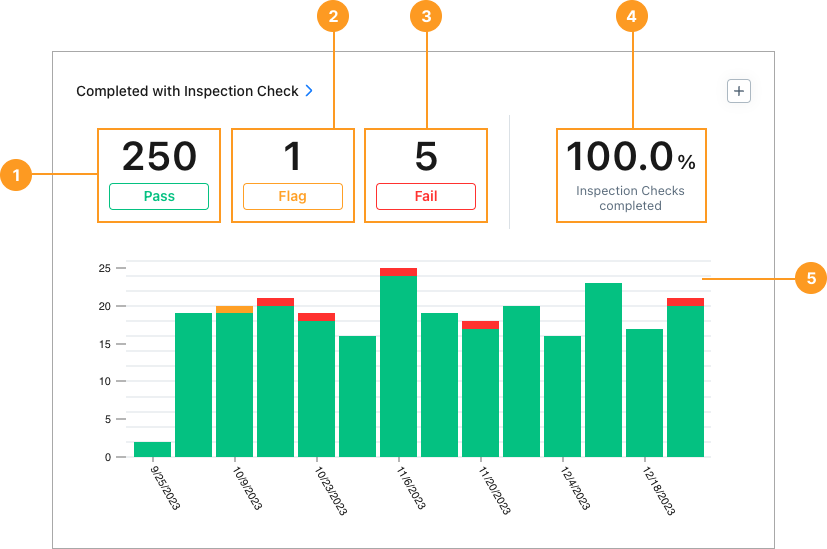
Statistics
| Stat | Description | Action | |
|---|---|---|---|
| 1 | Pass | The total number of work orders in the date range that have at least one passed inspection check and no failed inspection checks. | Select the total to display a list of work orders that passed inspection check. Select any work order in the list to view its details. |
| 2 | Flag | The total number of work orders in the date range that have at least one flagged inspection check and no failed inspection checks. | Select the total to display a list of work orders that were flagged during inspection check. Select any work order in the list to view its details. |
| 3 | Fail | The total number of work orders in the date range that have at least one failed inspection check. | Select the total to display a list of work orders that failed inspection check. Select any work order in the list to view its details. |
| 4 | % Inspection Checks Completed | The percentage of inspection checks that are completed with a Pass, Flag, or Fail. | None |
Charts
The stacked bar chart 5 shows a breakdown of inspection check results for each reporting period (day, week, month, etc.) in the date range.
-
Hover over:
- The green part of any bar to see the number of work orders in that period that passed their inspection check.
- The orange part of any bar to see the number of work orders in that period that had a flagged inspection check.
- The red part of any bar to see the number of work orders in that period that failed their inspection check.
-
Select any part of any bar to display a corresponding list of work orders in that specific period.
-
Select any work order in the list to view its details.
How to Read This Report
Use the Completed with Inspection Check report to assess the quality and outcomes of work that includes inspection procedures. The key thing to watch is the share of Fail results relative to Pass and Flag results.
- A high number of Fail results may indicate recurring issues with specific assets, locations, or procedures that need attention. Flag results are also worth monitoring, as they signal conditions that weren't outright failures but warrant follow-up.
- A consistently high share of Pass results suggests your inspection procedures are well-calibrated and your team is executing reliably.
From the sidebar, select Reporting > Reporting Details, to see report results for Pass, Flag, and Fail work orders grouped by Asset, Location, and more.